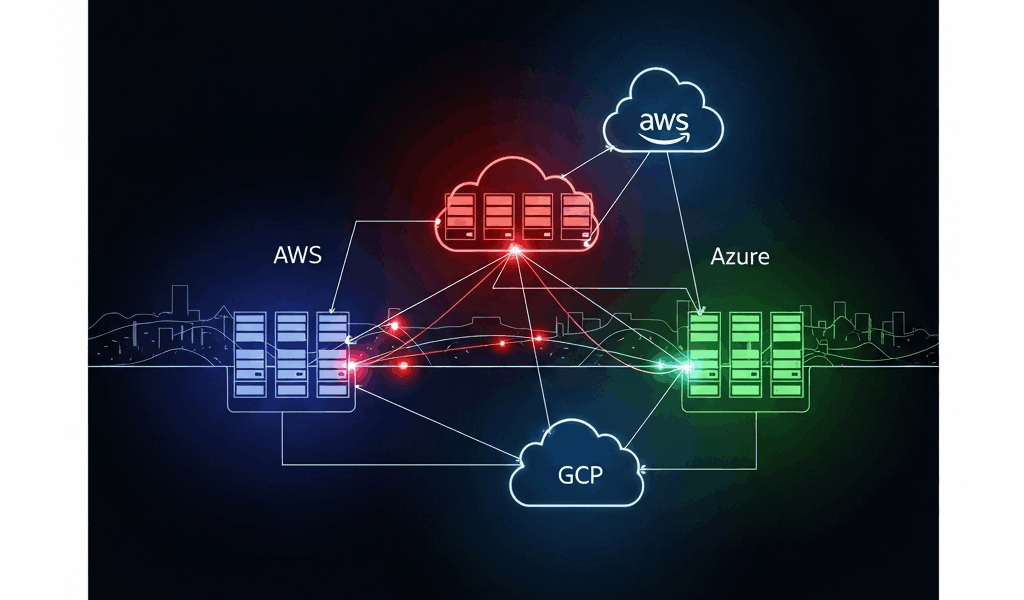
Why Multi-Cloud Kubernetes Fails Before It Even Starts
Multi-cloud Kubernetes has gotten complicated with all the vendor promises and architectural diagrams flying around. As someone who spent six months helping a fintech company deploy Kubernetes across AWS and GCP, I learned everything there is to know about how badly this can go sideways. Today, I will share it all with you.
The infrastructure looked solid on paper. Then pods couldn’t talk to each other across regions. Secrets leaked into logs. The bill tripled. We fixed each problem eventually — but fixing them in the right order would’ve saved us two months and a lot of ibuprofen.
Three mistakes kill multi-cloud setups before they get traction.
First: picking the wrong control plane model. Teams choose centralized or federated based on what sounds enterprise-y, not on what their workloads actually need. That decision cascades into months of rework nobody budgeted for.
Second: assuming your cloud provider’s native CNI will work across clouds. AWS VPC CNI doesn’t route to GCP. GCP’s default networking doesn’t know Azure subnets exist. Most engineers discover this when their first cross-cloud test fails — and they’ve already committed hard to that path.
Third: underestimating IAM complexity. Every cloud has its own identity system. Bolting them together with static credentials in Kubernetes secrets feels fast. It’s catastrophically insecure and breaks within months when someone rotates a key and forgets to update it across three clusters. Don’t make my mistake.
Picking a Control Plane Model That Spans Clouds
You have two real choices here: centralized control plane or federated independent clusters. That’s it. Everything else is a variation on one of those two.
Centralized Control Plane
One control plane manages workloads across all clouds. Google Anthos does this. Rancher does this. HashiCorp Consul can do this too. The appeal is obvious — single pane of glass, consistent policy, unified upgrades across the board.
Use centralized control if your team is under 50 engineers, you’re running fewer than four clusters total, and your workloads tolerate 200–400ms latency for management API calls back to the control plane. Smaller organizations standardizing on one primary cloud — say, GCP with Anthos — this is your lane. The control plane lives in one region. Worker nodes fan out everywhere else from there.
The cost is real, though. Anthos runs $10,000+ per month for enterprise support. Rancher’s licensing starts around $5,000 annually for three clusters. You’re also betting on one control plane, which means a network hiccup in that region can degrade all your clusters simultaneously. I’ve watched that happen at 2am on a Friday. Not fun.
Federated Independent Clusters
Each cloud runs its own Kubernetes cluster. A separate federation layer sits on top — Cilium Cluster Mesh, Submariner, or even manual Prometheus federation depending on your tolerance for pain. No single point of failure. Clusters are independent and can upgrade or fail independently without dragging everything else down.
Use this model if you’re managing more than four clusters, your team can handle distributed systems operations without melting down, or you need blast-radius containment. The tradeoff is real operational complexity. Multiple control planes to manage, separate upgrade schedules, and debugging failures across multiple API endpoints at once.
Most teams at scale go federated. Netflix runs this way. Shopify runs this way. You sacrifice simplicity for resilience. That’s what makes the federated model endearing to us infrastructure engineers who’ve been burned before.
Cross-Cloud Networking Without the Headaches
Networking is where multi-cloud setups actually fail. I’m not exaggerating — not even slightly.
Pod-to-pod communication across clouds requires explicit tunneling. Your AWS pods can’t just reach GCP pods by IP. The networks are completely separate. They don’t know about each other. Default cloud-native CNIs — VPC CNI, GKE’s default CNI — work only within their own cloud. Full stop.
Two tools solve this: Submariner and Cilium Cluster Mesh. So, without further ado, let’s dive in.
Submariner
But what is Submariner? In essence, it’s a tool that creates encrypted IPsec tunnels between Kubernetes clusters. But it’s much more than that — it works with any CNI, any cloud, any on-premises setup, and installation realistically takes an afternoon.
You run a broker cluster — lives on one cloud, coordinates the others — then deploy Submariner agents on each cluster. Pods discover each other via DNS. Pretty straightforward once you’ve done it once.
The cost is bandwidth overhead. Encrypted tunneling adds drag. Expect 5–10% throughput loss compared to same-region networking. Cross-cloud pod communication latency sits around 50–150ms depending on cloud distance — acceptable for most workloads, not acceptable for sub-millisecond finance applications or real-time gaming. Know your requirements before you commit.
Cilium Cluster Mesh
Cilium is an eBPF-based CNI that also runs in “cluster mesh” mode. It’s faster than Submariner for pod-to-pod communication — encryption isn’t on by default, though you can enable it — and it’s been heavily optimized for throughput. Setup is more involved. Cilium has a steeper learning curve, honestly. Budget extra time if your team hasn’t touched eBPF networking before.
I’m apparently wired toward simplicity, and Submariner works for me while Cilium’s setup complexity never quite clicked without dedicated study time. Your mileage will vary depending on your team’s background.
Use Submariner if you value simplicity and built-in security. Use Cilium if throughput is the priority and your team actually understands eBPF networking — not just “has heard of it.”
One critical point: document your latency expectations now. Cross-cloud networking will never match same-zone networking. If your application needs 10ms tail latency, don’t put critical components on different clouds. I’ve watched teams lose three weeks because they designed for latency they couldn’t physically achieve. That was painful to witness.
Handling IAM and Secrets Across AWS, GCP, and Azure
Probably should have opened with this section, honestly.
Each cloud has its own identity service. AWS uses IAM and STS. GCP uses service accounts and Workload Identity. Azure uses managed identities and AD. They don’t talk to each other natively. Your Kubernetes workloads need to authenticate to each cloud to pull images, access databases, send logs — and most teams fumble this badly.
The wrong way: storing static credentials as Kubernetes secrets. A developer can read those secrets with kubectl. So can anyone with cluster access. Credentials sit in etcd. They get backed up. They appear in logs. One leaked secret gives someone permanent access to your database and S3 bucket. That is not a hypothetical scenario.
The right way is workload identity federation. Each cloud lets Kubernetes service accounts authenticate directly without storing secrets anywhere.
AWS IAM Roles for Service Accounts (IRSA)
An EKS cluster’s OIDC provider signs Kubernetes service account tokens. Your pod requests a token from the Kubernetes API, then exchanges it for temporary AWS credentials via STS. Credentials expire in 15 minutes. No secrets stored anywhere. It’s genuinely elegant once you see it work.
Setup goes like this: create an OIDC provider for your EKS cluster, create IAM roles with trust relationships pointing to that OIDC provider, annotate Kubernetes service accounts with the role ARN. Pods automatically get temporary credentials injected via environment variables. That’s the whole thing.
GCP Workload Identity
GCP’s Workload Identity is more mature than IRSA — it’s been around longer and shows it. A Kubernetes service account binds to a Google service account. Pods authenticate to Google’s metadata service using their Kubernetes token, and Google’s API exchanges that for a Google access token. Same core concept, slightly different implementation details.
Setup: create a Google service account, create a Kubernetes service account, bind them using an annotation. Done. Much simpler than AWS once the model clicks in your head.
Azure AD Workload Identity
Azure’s version is the newest of the three. It uses Workload Identity Federation to exchange Kubernetes tokens for Azure access tokens. Setup mirrors AWS — an OIDC provider, a trust relationship, environment variables injected into the pod. The documentation has improved significantly in the last 18 months, for what it’s worth.
The Multi-Cloud Pattern
For a pod that needs to access resources on both AWS and GCP simultaneously:
- Create Kubernetes service accounts for each cloud’s identity needs — optional, but cleaner to separate them.
- Annotate them with the appropriate cloud’s role or service account reference.
- The pod’s startup script reads injected credentials from environment variables or mounted files.
- It authenticates to AWS using IRSA and to GCP using Workload Identity, simultaneously, without storing a single secret.
This works. I’ve run it in production across three environments. No secrets in etcd. No credential rotation headaches at 3am. Just time-bound tokens expiring naturally on their own schedule.
Checklist Before You Go Live on Multi-Cloud Kubernetes
Use this before deploying to production. Seriously — copy it into a Notion doc or a Confluence page and work through it with your team. Each item here represents a real failure mode I’ve watched unfold in production. Checking them now prevents the 3am pages later.
- Network connectivity test: Deploy test pods on each cluster. Verify they can reach pods on other clusters by IP. Measure actual latency numbers. If it’s over 500ms, flag it for the team before it surprises everyone in production.
- DNS resolution across clusters: Verify Submariner’s or Cilium’s DNS bridge actually works end-to-end. A pod on AWS should resolve a service name on GCP without hardcoding IPs anywhere. Test both A records and SRV records if your application uses them.
- IAM audit: Scan every cluster for Kubernetes secrets containing cloud credentials. Falco works well here, or pull your audit logs manually. Find any? Document who created them, remove them immediately, and migrate to workload identity federation before anything else.
- Certificate validation: If you’re using TLS for cluster-to-cluster communication, verify certificates are valid for 90+ days and you have rotation automation in place. Manual certificate rotation across four clusters in production is a debugging nightmare — ask me how I know.
- Cross-cluster observability: Set up Prometheus scraping across all clusters, or pick a vendor like Datadog or New Relic that can ingest metrics from all your clusters simultaneously. Single-cluster monitoring on a multi-cloud setup makes debugging impossible when an issue spans two clouds at once.
- Log aggregation: All clusters should send logs to a central sink — Elasticsearch, Loki, CloudWatch, Stackdriver, pick one and commit to it. When a workload fails across two clouds, you need logs from both places in one search window.
- Cost monitoring: Set up billing alerts per cloud before anything goes live. Multi-cloud regularly surprises teams with egress charges — data leaving AWS headed to GCP costs real money. I’ve watched bills spike 40% after multi-cloud deployment with no alerting in place. Set the alerts first.
- Network policy test: Verify your network policies actually enforce across cluster boundaries. Some CNIs don’t enforce policies on cross-cluster traffic at all. Test this explicitly. If your policy says only pods labeled app=web can reach your database, verify that holds from another cloud — don’t assume.
- Failover test: Simulate one cluster going completely offline. Does traffic failover to the other cluster? Does your ingress controller handle it automatically or does it need manual intervention? Test this. Practice the runbook. Then practice it again.
- Upgrade plan: Document how you’ll upgrade Kubernetes versions across clusters without downtime before you need to do it under pressure. Federated clusters let you upgrade one at a time. Centralized control planes need a zero-downtime strategy for the control plane itself — figure that out now, not during the upgrade window.
Work through this list methodically. Every item on it came from a real production failure somewhere. Checking them now is tedious. Discovering them at 3am under an active incident is much, much worse.



Stay in the loop
Get the latest multicloud hosting updates delivered to your inbox.