The Three Purchase Models and What Each Actually Costs
Reserved instances vs spot instances AWS cost savings has gotten complicated with all the vendor noise flying around. I spent about three weeks buried in this question while running infrastructure for a mid-sized SaaS company — we were burning $40k/month on EC2 alone, which has a way of focusing the mind. Every answer I found was either AWS documentation that explained the mechanics without telling me what to actually do, or blog posts from cost optimization vendors who, shockingly, wanted me to buy their tools. This skips both of those. It’s a practitioner framework with specific allocation math.
Start with the raw numbers. The discount tiers drive every decision downstream.
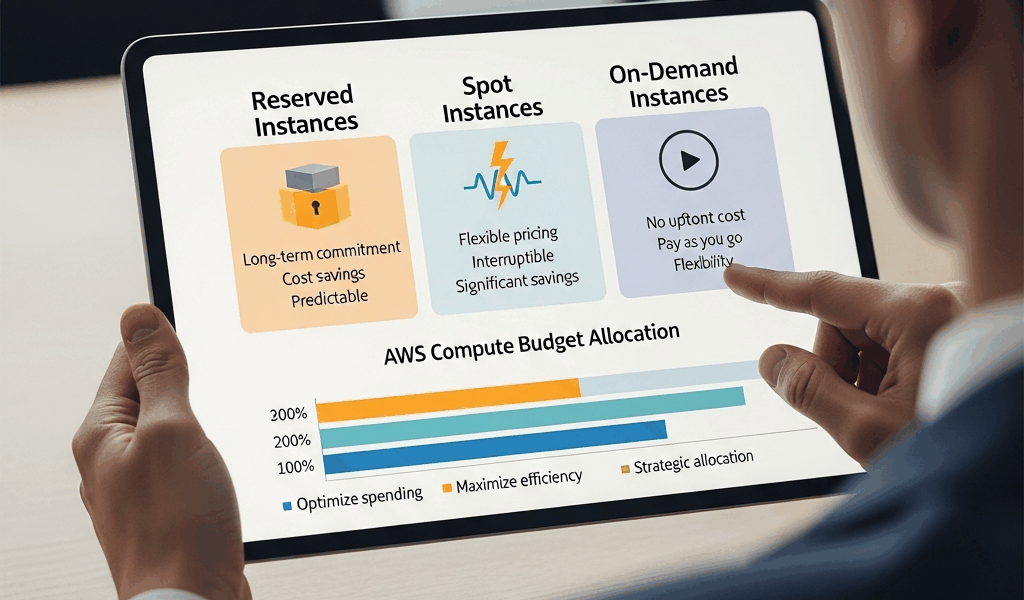
On-Demand is full rack rate. No commitment, no discount, billed by the second. An m5.xlarge in us-east-1 runs roughly $0.192/hour — about $140/month per instance. Convenient. Expensive.
Reserved Instances — 1-Year No Upfront drop that to roughly $0.114/hour on the same instance. Approximately 40% cheaper. You’re committing to pay for 12 months whether or not you use it. That last part matters more than most people actually internalize when they first start buying reservations.
Reserved Instances — 3-Year All Upfront push the discount to 60–65%. You write one check. For the same m5.xlarge, you’re paying around $0.070/hour amortized — roughly $1,850 total over three years versus $5,040 at On-Demand rates.
Spot Instances offer 70–90% off On-Demand. That same m5.xlarge might run $0.025–0.045/hour on Spot depending on availability zone and current market. The catch is hard and non-negotiable: AWS can reclaim that instance with two minutes’ notice. No exceptions, no appeals, no “but my job was 90% done.”
Savings Plans — Compute deliver roughly the same discount tier as Reserved Instances but with one critical structural difference. The commitment is to a dollar-per-hour spend rate, not a specific instance type. Buy a $0.10/hour Compute Savings Plan and it automatically applies to whatever EC2 — or Fargate, or Lambda — compute you run, across families, sizes, and regions. AWS launched these in 2019, and they’ve honestly replaced traditional RIs as the default recommendation for most general compute workloads.
The decision isn’t which of these is cheapest in isolation. The decision is how to bucket your actual workloads across all three.
What to Reserve vs What to Spot
Frustrated by a $6,200 month of wasted Reserved Instance spend after a product sunset, I went back and built a methodology from the wreckage. Don’t make my mistake.
Pull your CloudWatch metrics or Cost Explorer data for the past 30 days. Find your lowest hourly instance count for each instance family — not the average, the actual floor. That number is your reservation candidate. If you never ran fewer than seven m5.xlarge instances during any single hour over the past month, you have a defensible case for reserving seven instances. Not eight. Not ten.
Probably should have opened with this section, honestly, because over-reserving quietly kills more AWS budgets than any other single decision.
Workloads That Belong on Spot
- Batch processing jobs — ETL pipelines, data transformation, anything that can be requeued if it dies mid-run
- CI/CD build workers — GitHub Actions self-hosted runners, Jenkins agents, CodeBuild overflow capacity
- Rendering and encoding — video transcoding, image processing queues, anything embarrassingly parallel
- ML training with checkpointing — if your training job saves state every N steps, a Spot interruption costs you minutes, not hours
- Web crawlers, scraping pipelines, simulation workloads
Workloads That Should Never Touch Spot
- Databases of any kind — PostgreSQL, MySQL, Redis, Elasticsearch
- Stateful application servers holding session data in memory
- Anything that cannot complete a graceful shutdown in under 90 seconds
- Your payment processing service at 11pm on a Friday
- Any workload where an interruption triggers a customer-facing error
The two-minute warning is real. I watched a Spot interruption arrive at the exact moment a batch job was writing its output file — a Tuesday afternoon, nothing special about the day. The data was fine, we had retry logic, but the job took 40 minutes to rerun. That’s the tax. Build your architecture to absorb it or don’t use Spot.
For everything between “runs 24/7 at a predictable level” and “fully interruptible batch work” — variable application tiers, dev environments with irregular hours, staging infrastructure — Savings Plans handle the discount without the interruption risk or the over-reservation trap.
The Savings Plan vs Reserved Instance Decision
A lot of AWS practitioners are apparently still running on pre-2019 mental models here. Reserved Instances used to be the only game in town for committed-use discounts. Then Compute Savings Plans arrived and changed the calculus for most workloads.
Compute Savings Plans win when:
- You’re migrating between instance generations (m5 to m6i, c5 to c6g) — your Savings Plan applies automatically, no conversion required
- Your workload mix might shift between instance families over the commitment period
- You run across multiple regions and want a single commitment covering all of them
- You use Fargate or Lambda alongside EC2 — Compute Savings Plans apply to all three
Reserved Instances still win when:
- RDS — there is no Savings Plan equivalent for RDS. Reserved DB Instances are still the only committed-use discount mechanism for managed databases.
- You have a single instance type that genuinely won’t change for three years — EC2 Instance Savings Plans offer slightly deeper discounts within a family, but standard 3-year All Upfront RIs still edge them out for truly locked workloads
- ElastiCache, OpenSearch, Redshift — same story as RDS, no Savings Plan coverage
EC2 Instance Savings Plans sit in the middle. Family-specific — you commit to, say, m-family in us-east-1 — but flexible within that family across sizes and OS types. The discount runs slightly better than Compute Savings Plans, roughly 54–58% vs 40–50%, but you lose cross-family and cross-region flexibility.
My current default for most teams: Compute Savings Plans for EC2 general compute, Reserved DB Instances for RDS, Spot filling in the gaps for interruptible workloads. That three-layer stack covers 85% of AWS compute spend patterns without requiring you to predict your exact instance mix 36 months out.
The 60% Savings Math — A Real Workload Example
Confronted by a monthly AWS bill showing $1,680 of EC2 spend on ten m5.xlarge On-Demand instances running 24/7, a reasonable engineer starts doing allocation math. Here’s the breakdown for that exact scenario.
Starting point: 10x m5.xlarge at $0.192/hour = $1,382/month On-Demand. The $1,680 figure includes some variable overhead — let’s work with the clean numbers.
Step 1 — Reserve the baseline. Usage analysis shows the minimum is 7 instances running at all times. Buy 1-Year No-Upfront Reserved Instances for 7x m5.xlarge at $0.114/hour.
7 instances × $0.114 × 730 hours = $582/month for the baseline.
Step 2 — Spot for variable capacity. The remaining 3 instances handle variable load — stateless application servers with health check grace periods. Run them as a Spot fleet with mixed instance types (m5.xlarge, m5a.xlarge, m4.xlarge as fallbacks). Spot pricing for this family in us-east-1 runs $0.030–0.045/hour depending on AZ and time of day.
3 instances × $0.037 average × 730 hours = ~$81/month for the variable tier.
Step 3 — Burst capacity via Spot fleet. Occasional traffic spikes require up to 4 additional instances for 2–4 hours at a time, roughly 15 times per month. Maybe 50 instance-hours of burst total.
50 hours × $0.037 = ~$1.85/month. Essentially rounding error.
Total: ~$665/month vs $1,382 On-Demand = 52% savings.
Now extend the reservation term. Swap those 7 Reserved Instances from 1-Year No-Upfront to 3-Year All-Upfront at roughly $0.070/hour amortized:
7 × $0.070 × 730 = $358/month for the baseline.
Total with 3-year commitment: ~$441/month. That’s 68% below the original On-Demand spend. The All-Upfront reservation requires a lump-sum payment, so cash flow profile matters — but the math is unambiguous for stable workloads.
The percentage allocation — 70% reserved, 30% Spot — isn’t arbitrary. It’s derived from your actual usage floor. If your floor is 5 out of 10 instances, reserve 5 and Spot the rest. Let the data drive the split, not instinct.
Common Mistakes That Kill Savings
These aren’t hypothetical. I’ve personally made two of them and watched the other three surface during incident reviews in production environments.
Over-Reserving the Baseline
Buying 10 Reserved Instances because your average is 10 instances is the most expensive mistake in this category. Averages lie. If you dip to 6 instances every Sunday night, those 4 unused reservations still bill. Calculate the floor. Reserve the floor. Use On-Demand or Savings Plans to cover the average above the floor.
Wrong Region on Standard Reserved Instances
Standard Reserved Instances are region-specific and not automatically transferable. A reservation in us-east-1 does not cover an m5.xlarge spinning up in us-west-2. I watched an engineering team buy 20 RIs in us-east-1 — this was on a Wednesday, routine purchasing decision, nobody thought much of it — and then migrate their production workload to eu-west-1 three months later. The us-east-1 RIs ran for nine more months covering test workloads nobody wanted to waste the reservation on. If you’re running multi-region, either use Compute Savings Plans or buy separate reservations per region.
Ignoring Convertible Reserved Instances
Convertible RIs allow you to exchange your instance type during the term. The trade-off is about 6 percentage points of discount — roughly 54% vs 60% for 3-year terms. For workloads likely to move across instance generations, and most workloads do over a 3-year horizon, 54% discount on an instance you actually use beats 60% on an instance you’ve outgrown. If you’re buying 3-year commitments, consider convertible for any workload where compute requirements might shift.
Spot Instance Advisor — Actually Use It
Some instance types in specific Availability Zones have interruption rates above 15%. Others run below 5% for months at a time. The AWS Spot Instance Advisor — available at aws.amazon.com/ec2/spot/instance-advisor — shows historical interruption frequency by instance type and region. Building a Spot fleet around m5.xlarge in us-east-1a without checking interruption rates first is just guessing. The tool is free and takes four minutes to consult. That’s probably the best option for designing your Spot fleet’s instance diversification list, as Spot architecture requires knowing your actual interruption exposure. Without that data you’re flying blind.
Forgetting RDS Reservations Entirely
Teams optimize EC2 spend aggressively and then leave their RDS instances running On-Demand for years. A db.r5.2xlarge Multi-AZ in us-east-1 runs about $1.40/hour On-Demand. A 1-year No Upfront Reserved DB Instance for the same class drops that to roughly $0.84/hour — 40% savings, same mechanics as EC2. RDS Reserved Instances apply at the instance class level, and 1-year terms are usually the right call for databases since schema and sizing changes happen more often than teams expect.
The framework is straightforward even if the execution requires pulling real usage data. Reserve your floor. Spot your interruptible batch work. Use Compute Savings Plans for the variable middle. Check Spot interruption rates before committing to a fleet configuration. And revisit your reservations every six months — workloads shift, and a reservation that made sense 18 months ago might now be covering instances you no longer need the way you originally did.



Stay in the loop
Get the latest multicloud hosting updates delivered to your inbox.